The Deck of Cards Goes Digital: How Card Play Is Taking Over Web Design
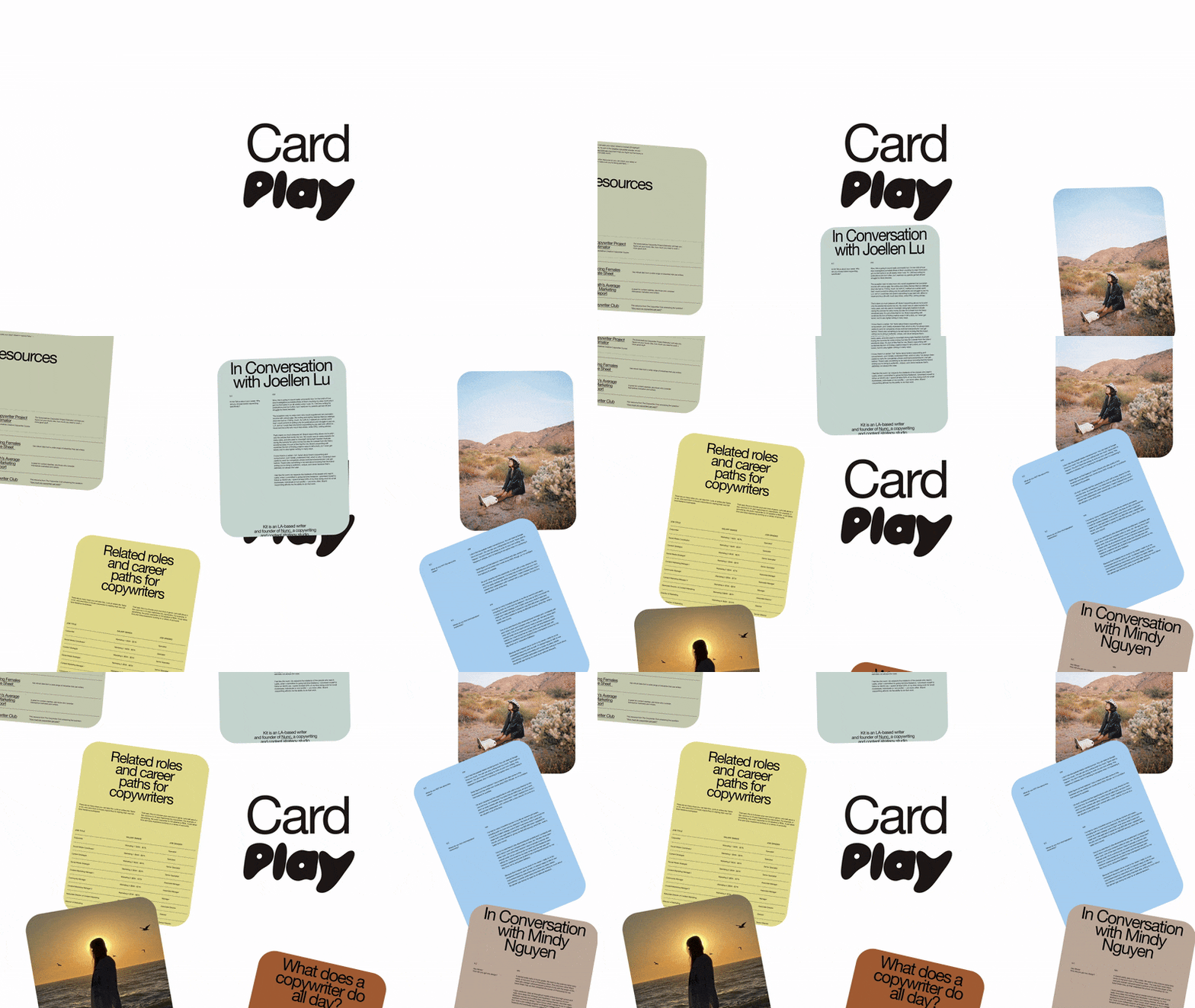
Grab your favorite deck of cards and practice your shuffling, because Card Play is all the rage in web design in 2026. The grid system that has long served as the foundation of web design is evolving, taking on even more fun and functionality. With each card acting as a tactile module that brings structure and play into balance, Card Play transforms websites into a form of interactive storytelling.
We partnered with ilovecreatives founder and ilovecreatives Studio executive creative director Puno to identify the five hottest trends in web design in 2026. Here, we’ll explore Card Play, sharing the defining characteristics and how you can incorporate the trend on Squarespace.
Structure meets fun
The Card Play aesthetic breaks content into digital cards that act as containers for information, images, text, or links. This structure enhances navigation and user experience (UX), presenting topics and messages in manageable, visually appealing pieces that guide visitors to learn more or take the next step.
Card Play is extremely versatile—it works across industries and niches, and can be applied to a client’s existing branding without straying from their visual identity. Simple yet effective, it’s practical for responsiveness on both mobile and desktop while still feeling fresh and modern.
Because it keeps content clear and organized, Card Play is especially helpful for visitors who skim or browse on the go, highlighting key information and inviting further exploration. Its grid-based layout also feels instantly familiar to anyone who uses social media, making the experience intuitive and easy to digest.
Hit me: How Card Play appears in web design
Card Play brings order to websites in a fun and interesting way, giving you creative freedom without confusing visitors. In this iteration of the digital card aesthetic, cards feature rounded corners and soft edges. They contain pictures, icons, and basic information conveyed through strong but concise copy, beckoning the visitor to click to learn more. Card Play works on both desktop and mobile screen sizes, emphasizing its versatility and adaptability across projects.
Shadowed layers and stacking give cards depth, bringing them beyond the typical grid format and adding visual interest. Micro-animations and flips add interactivity to the site experience, and can be used to imitate the feeling of flipping a physical card.
Card Play does require rich content—whether in the form of copy or images, color, brand identity, or typography. In this way, Card Play doesn’t invite monotony but gently pushes against it; maintaining order while offering visual intrigue.
With Card Play, you invite interactive hierarchy cues, enhancing visitor engagement. Cards need not be the same size. In fact, you can use various card sizes to draw the visitor’s attention to particular visuals or key messages.
Incorporating Card Play on Squarespace
Squarespace’s Fluid Engine content editor makes it possible to incorporate the Card Play trend on any website without code:
(Coming soon!) Combine block transforms with responsive editing to move or resize bento-style modules at each breakpoint, keeping the card layout clean across devices.
(Coming soon!) Add block animations, like scale or fade effects on hover, to give cards a tactile, interactive feel.
Combine pinned blocks with animations to create card elements that stay in view as visitors scroll, reinforcing the hierarchy and brand message.
Build navigational elements by stacking rounded-corner buttons, creating a card-like menu that feels structured yet playful.
Display pricing tiers in square or rectangular blocks with rounded corners, echoing the modular card look. This is ideal when you don’t need product block functionality.
Showcase products by placing three to four product blocks with rounded corners side by side, creating a clean, unified card layout that links items efficiently for ecommerce clients.
Use a summary block in grid mode to showcase blog posts with strong thumbnails and simple text. Omit titles or excerpts for a cleaner, card-forward layout.
Use text blocks with background styling and rounded corners to highlight short lists or key details (e.g., “What You’ll Learn,” “About This Brand”), keeping information digestible and visually cohesive.
Set gallery blocks to grid mode with consistent aspect ratios, adding subtle hover states (like on-hover captions) to make each item feel like an interactive card.
Use gallery sections to build neatly aligned testimonial cards in a carousel or list, giving social proof a polished, engaging feel.
Pro tip: When implementing Card Play, be intentional with the white space inside each “card” to give visitors a visual break. Depending on how much space you include between cards, it may seem void of blank space (a minimalist’s nightmare). The space within them actually prevents the layout from feeling cluttered. Prioritize clean copy, strong visuals, and meaningful CTAs to make each card feel purposeful and easy to engage with.
A winning hand in web design
Card Play ushers in a new era of information architecture, one that pairs strong UX principles with a clean, engaging visual language that drives visitors toward action. The aesthetic works well across mobile and desktop and adapts to a wide range of client needs. With its clarity, structure, and playfulness, Card Play is a trend poised for powerful creative exploration in 2026 and beyond. Shuffle up and deal!
Read about more 2026 trends in web design:
Which 2026 design trend suits your personality?
Want more?
Check out Squarespace Circle, Squarespace’s program for professional designers and web design agencies. Along with exclusive content, discounts, and other perks, Circle brings experts together from across the globe to exchange advice while connecting with new clients and collaborators.